
Introduction
You can track keywords in Google Analytics, but GA4 does not collect a complete list of Google search queries on its own. The practical method is to connect Google Search Console to your GA4 property, publish the Search Console report collection, and use the Queries and Google organic search traffic reports.
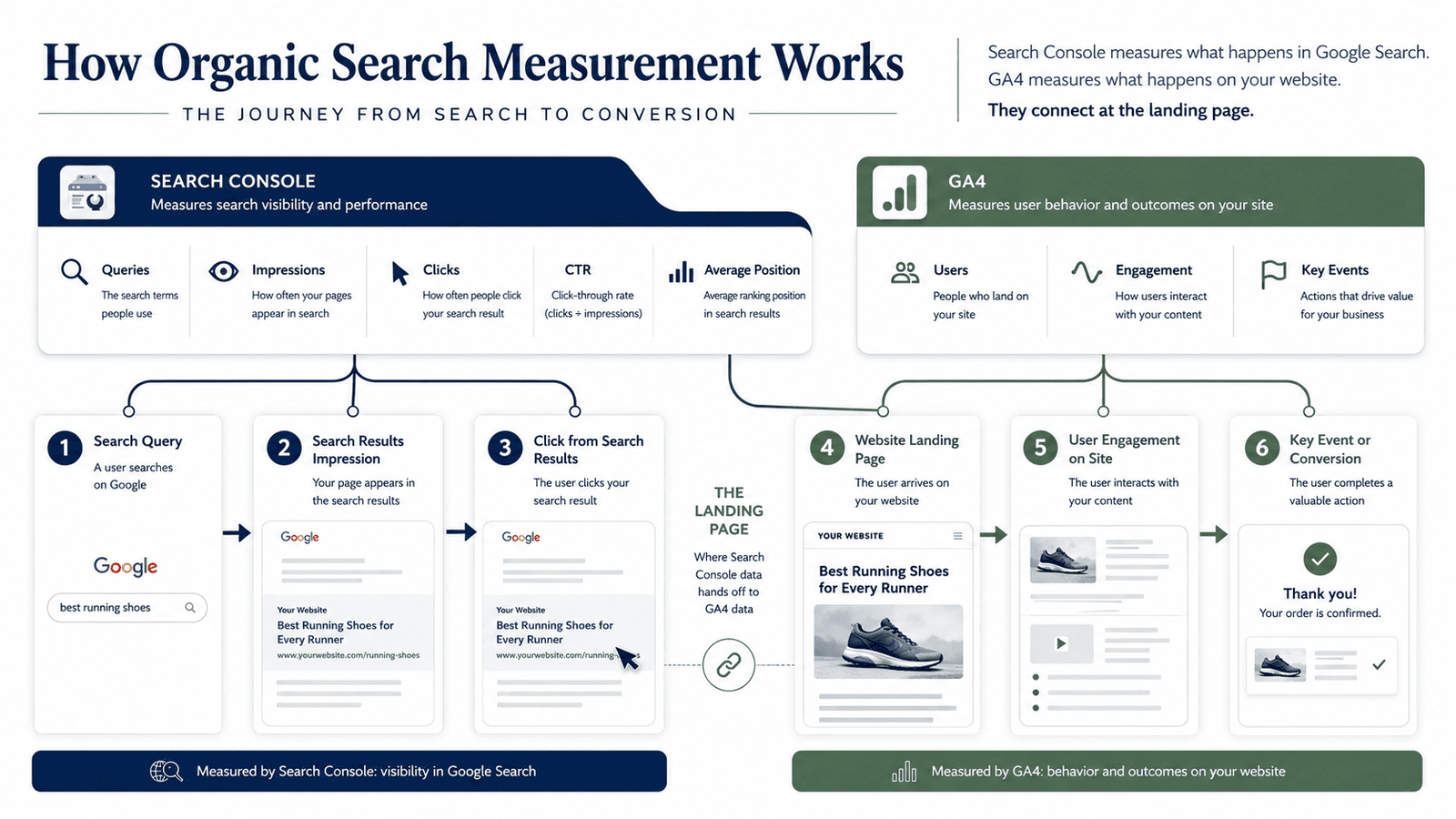
Search Console shows which Google queries generated impressions and clicks, while GA4 helps you evaluate the landing pages, engagement and important actions that followed those visits. Used together, the two platforms give you a more useful view of SEO than rankings alone.
This guide explains the current setup, where to view keywords in Google Analytics, how to interpret the main metrics, how to measure SEO in Google Analytics and what WordPress site owners should check when reports are missing.
Can You Track Keywords in Google Analytics?
Yes, but the wording matters. GA4 can display Google organic search query data after you connect an eligible Search Console property. The query information still comes from Search Console. GA4 is the reporting environment where you can view that Search Console data beside selected Analytics information.
Google provides two Search Console reports in GA4:
- Queries, which displays organic Google search queries with Search Console metrics.
- Google organic search traffic, which displays landing pages with both Search Console and compatible Analytics metrics.
The Queries report can be explored through Search Console dimensions such as query, country and device. It cannot be freely combined with every Analytics dimension. The landing-page report provides the stronger bridge between search visibility and on-site performance.
Google's official Search Console and Analytics integration documentation explains the scope and compatibility limits.
That means you should not expect GA4 to identify the exact organic keyword responsible for every lead or sale. A sound SEO tracking model uses query data to understand discovery, landing-page data to understand entry points and GA4 events or key events to measure what visitors did afterward.
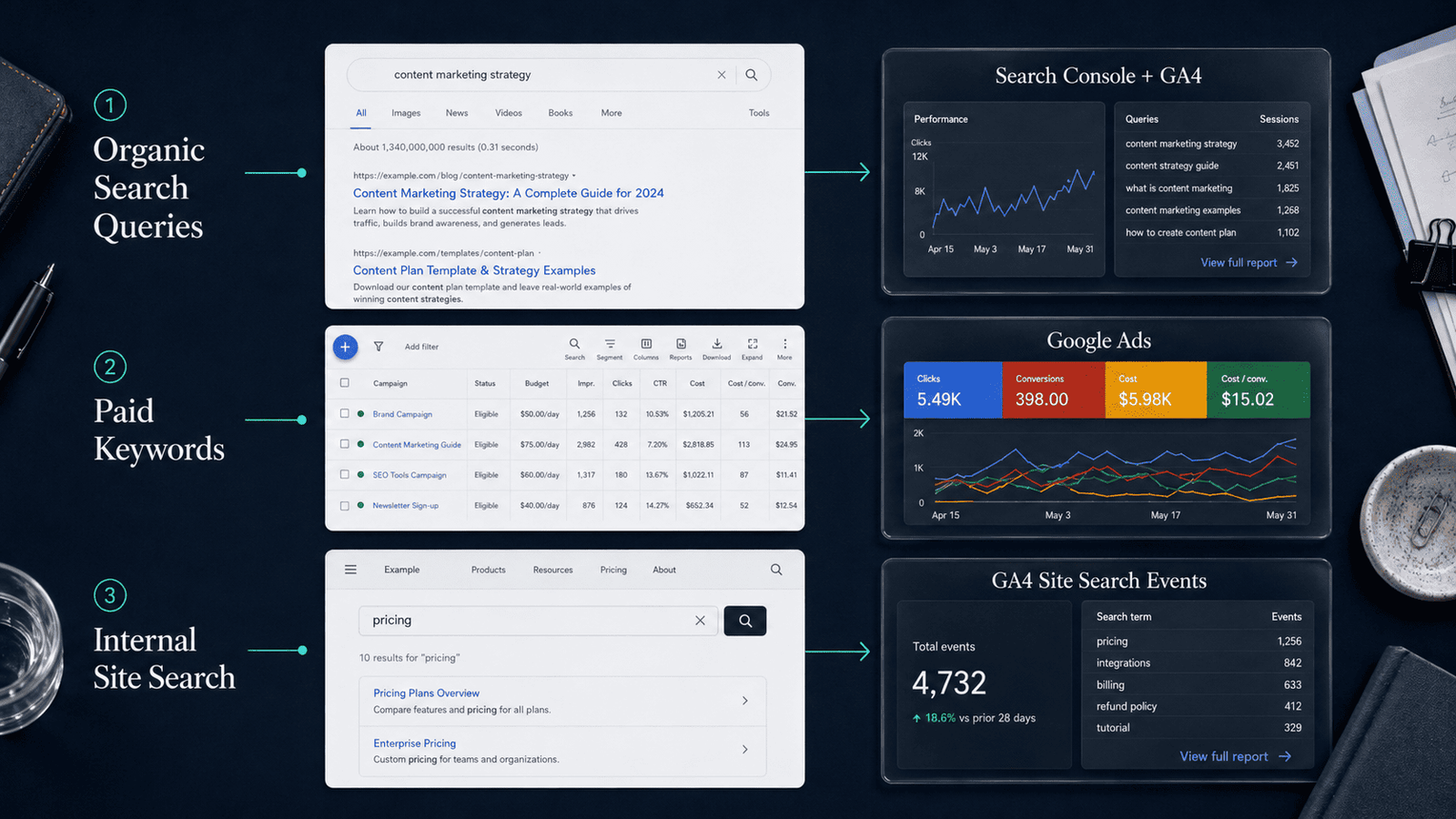
Organic queries, paid keywords and site-search terms are different
The word "keyword" can refer to three separate data types. Mixing them produces misleading reports.
| Data type | What it represents | Where to view it |
|---|---|---|
| Organic Google query | The phrase associated with your appearance in unpaid Google Search results | Search Console or linked Search Console reports in GA4 |
| Paid-search keyword or search term | Advertising data related to paid campaigns | Google Ads and linked advertising reports |
| Internal site-search term | A phrase entered into the search box on your own website | GA4 site-search event data |
GA4 Enhanced Measurement can collect internal search activity through the view_search_results event when the site uses recognizable query parameters. Its search_term parameter describes what visitors searched for on your website, not what they typed into Google before arriving.
What You Need Before You Start
Before you try to check keywords in Google Analytics, confirm that the basic measurement setup is correct.
You need:
- A GA4 property with a web data stream for the website
- A verified Google Search Console property
- GA4 Editor access
- Verified owner status for the Search Console property
- Analytics and Search Console properties covering the same pages
- Enough organic search visibility for queries to appear
Google requires the Editor role in GA4 and verified ownership of the Search Console property to create the link. The selected properties should represent the same set of web pages.
For example, linking a Search Console property for one subdomain to a GA4 stream that measures a different website can lead to incomplete or confusing reporting.
If GA4 is still new to you, review this Google Analytics for beginners guide first. It explains the platform's basic structure, reports, events and common terminology.
A small site may have a correct setup and still show limited query data. That does not automatically mean the integration has failed. Search Console needs impressions and clicks to build useful query reports, and some low-volume queries are omitted to protect privacy.
How to Track Keywords in Google Analytics
The current process has two parts: create the Search Console link and publish the report collection. Many users complete the first task but miss the second, which is why the Queries report appears to be unavailable.
Step 1: Verify the correct Search Console property
Open Google Search Console and confirm that the website property is active. Review whether you are working with a Domain property or a URL-prefix property.
A Domain property can cover protocols and subdomains under the verified domain. A URL-prefix property is limited to the exact prefix entered during verification. The best option depends on how your site is configured, but the property you link must match the pages measured by the GA4 web stream.
Check the Search results Performance report. If it already contains clicks, impressions, pages and queries for the correct site, you have a useful signal that the property is collecting data.
Google describes the Search Console Performance report as the place to examine search traffic over time, the queries showing the site and pages with stronger or weaker click-through rates.
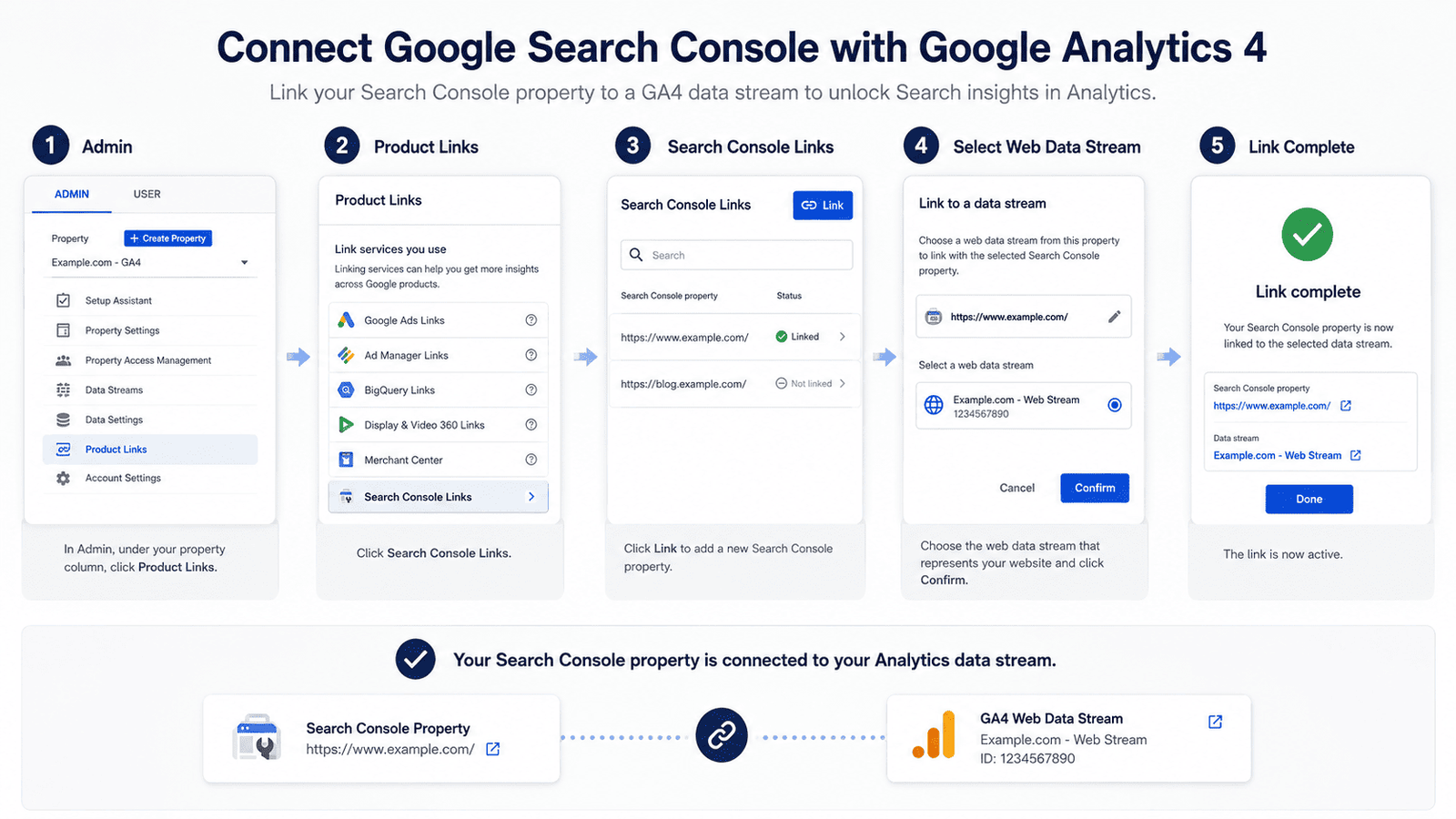
Step 2: Link Google Search Console to GA4
In Google Analytics:
- Open Admin.
- Under Product links, choose Search Console Links.
- Select Link.
- Choose the Search Console property you manage.
- Confirm the selection.
- Select the matching GA4 web data stream.
- Review the configuration and submit it.
Google currently allows one Search Console property to be linked to one web data stream, and a GA4 property can have only one data stream linked to Search Console. If the wrong stream is selected, the link may need to be deleted and recreated rather than edited in place.
Do not rush the property selection. A company may have several Search Console properties for HTTP, HTTPS, www, non-www, subdomains or migrated domains. Link the version that represents the live pages included in your GA4 stream.
Step 3: Publish the Search Console report collection
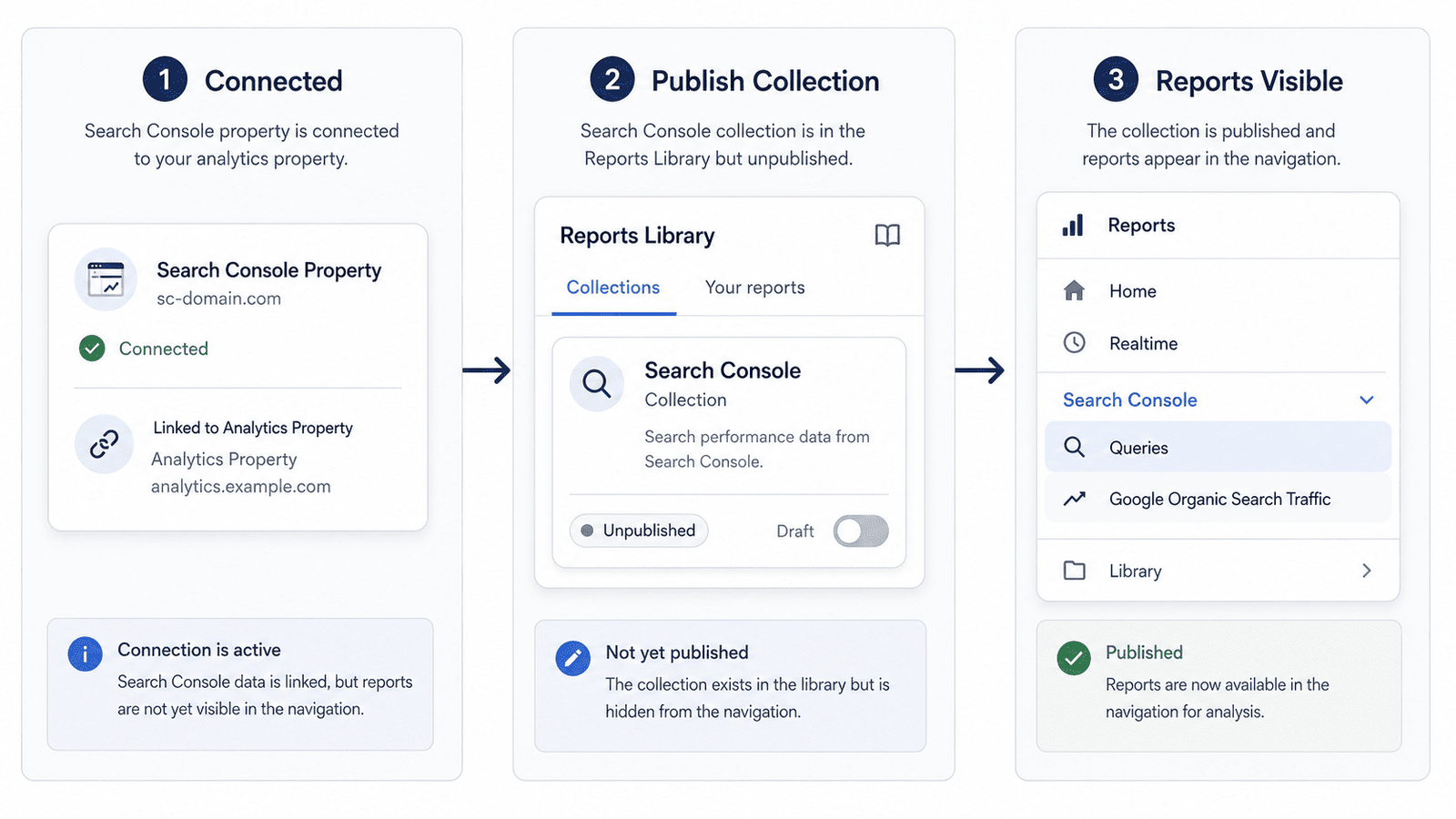
Creating the link does not always place the new reports in the left-hand navigation. Google states that the Search Console collection is unpublished by default.
To publish it:
- Open Reports in GA4.
- Select Library near the bottom of the Reports navigation.
- Find the Search Console collection.
- Open its menu and choose Publish.
- Return to Reports and look for the Search Console section.
Once published, the collection should include the Queries report and the Google organic search traffic report. If the Library is unavailable, you may not have the required property permissions. Editors and administrators can manage report collections.
This step deserves special attention because it solves a common problem: the integration can be active even when the reports are absent from the standard navigation.
Step 4: Track keywords in Google Analytics with the Queries report
Open:
Reports -> Search Console -> Queries
The primary dimension is the organic Google search query. The report can include:
- Organic Google search clicks
- Organic Google search impressions
- Organic Google search click-through rate
- Organic Google search average position
This is the main report for anyone trying to view keywords in Google Analytics. It reveals the searches associated with your Google visibility and traffic, subject to Search Console's privacy and data limits.
Start with a practical date range, such as the most recent 28 days, and compare it with the previous period. Very short date ranges can create noise, especially on smaller sites. Seasonal businesses should also compare against the same period in the previous year when enough history is available.
Next, inspect queries through three lenses:
Visibility: Which queries generate impressions, even when clicks are low?
Traffic: Which queries produce meaningful numbers of clicks?
Opportunity: Which relevant queries have substantial impressions but weak CTR or an average position that suggests room for improvement?
Do not treat every unexpected query as a problem. A page can appear for broader variations, synonyms, questions and long-tail searches that were never placed verbatim in the copy.
The important question is whether the query matches the page's purpose and attracts the right audience.
Step 5: Open the Google organic search traffic report
Open:
Reports -> Search Console -> Google organic search traffic
This report is organized around landing page + query string, not individual search queries. It combines Search Console metrics with compatible Analytics metrics for the linked property. It can also be explored by country and device.
The report is valuable because it helps you move from "Which terms show my site?" to "Which pages receive organic visibility and what happens when users land there?"
For each landing page, consider:
- Search impressions and clicks
- Organic CTR
- Average position
- Active users
- Engaged sessions
- Engagement rate
- Key events, where available in your report configuration
A page with rising clicks but falling engagement may be attracting broader or less relevant traffic. A page with modest traffic but strong key-event performance may be commercially valuable.
A page with strong impressions and weak CTR may need a clearer title, a stronger search-result promise or better alignment with the query.
Step 6: Compare devices, countries and periods
Keyword performance is not uniform. Mobile and desktop results can differ because search layouts, user behavior, page speed and intent differ. International sites may also see different query language, demand, competition and conversion behavior by country.
Use the available Search Console dimensions to compare:
- Mobile, desktop and tablet
- Priority countries
- Current period versus previous period
- Current period versus the same period last year
- Brand-related versus non-brand search patterns, where available
- New or recently updated pages versus established content
Search Console defines clicks, impressions, CTR and average position at the search-results level. Average position refers to the average position of the topmost result from your site for the relevant grouping. It is not a permanent, universal ranking for every user.
Use comparisons to identify direction, not to overreact to one-day movement. A stable upward trend across several weeks is usually more useful than a single high or low day.
Step 7: Build a repeatable SEO tracking report
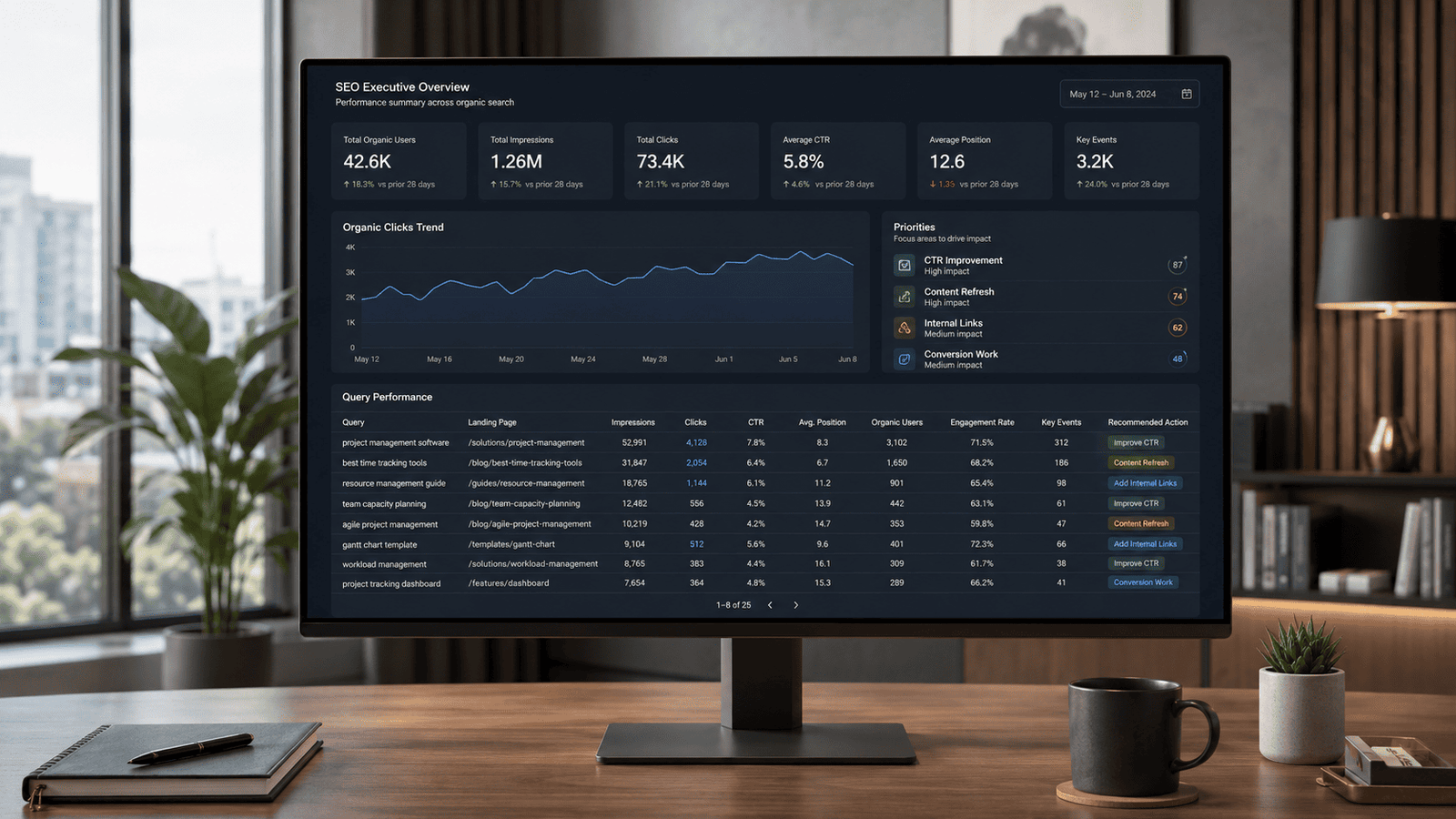
A keyword report becomes useful when it produces decisions. Create a monthly worksheet or dashboard with the following fields:
| Field | Purpose |
|---|---|
| Query | Identifies the search demand |
| Primary landing page | Shows which page Google connects with the query |
| Impressions | Measures search visibility |
| Clicks | Measures traffic from Google Search |
| CTR | Indicates how often an impression becomes a click |
| Average position | Provides ranking context |
| Organic sessions or users | Shows post-click traffic in GA4 |
| Engagement rate | Helps assess visit quality |
| Key events | Connects organic visits with important actions |
| Recommended action | Converts reporting into work |
Add a notes column for content changes, title updates, internal links, technical fixes and publication dates. Without an implementation record, it becomes difficult to connect performance changes with the work completed.
Avoid creating a report with hundreds of keywords and no priorities. Group actions into manageable categories such as quick CTR improvements, content refreshes, internal-link opportunities, technical investigations and high-value pages requiring conversion work.
Understanding Keywords in Google Analytics
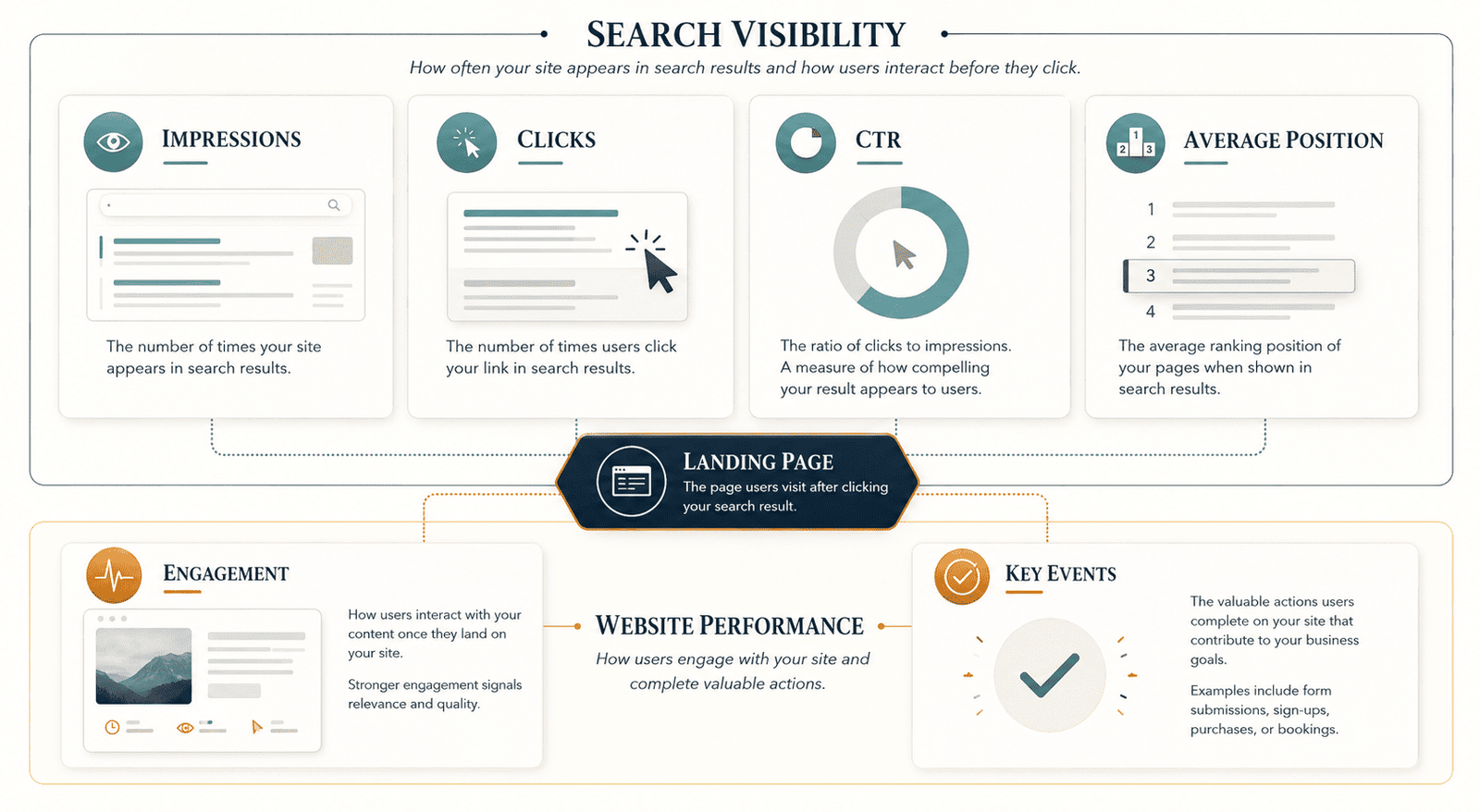
Understanding keywords in Google Analytics requires understanding what each metric can and cannot prove. Search Console measures performance in Google Search. GA4 measures activity on your website or app. Their numbers describe different stages of the journey.
Impressions
An impression generally indicates that a result from your site appeared in Google Search under Search Console's counting rules. Impressions reveal visibility, not visits.
High impressions can signal:
- Existing demand for the topic
- Broader relevance than expected
- A page appearing below the positions that receive most clicks
- A title or result presentation that is failing to earn attention
- Search intent that the page only partially satisfies
A rise in impressions with flat clicks is not necessarily a failure. It may mean Google is testing the page for more queries or that rankings have improved enough to create visibility but not enough to generate many clicks.
Clicks
Clicks measure users selecting your result from Google Search. They are closer to traffic than impressions, but they will not always match GA4 sessions exactly.
Search Console counts activity on Google Search, while GA4 depends on the Analytics tag loading and recording activity on the destination site. Consent choices, browser restrictions, tagging problems, redirects, time zones and counting methods can create differences.
Treat the platforms as complementary rather than expecting identical totals.
Click-through rate
CTR is clicks divided by impressions. It helps you assess whether search visibility turns into traffic.
Google reports the metric as a fraction in the GA4 Queries report, although the interface may display it as a percentage.
Low CTR can have several causes:
- The result appears too low on the page
- The title is vague or repetitive
- The description does not match the search need
- Other search features satisfy the user before a click
- The query is only loosely relevant
- The result competes with a strong brand or specialized source
Do not rewrite a title based on CTR alone. Review position, query intent, device, country and the current search-results layout first.
Average position
Average position provides directional ranking context. It should not be read as "my page ranks at exactly this position for everyone."
Results vary by query, device, country, search context and the type of search feature shown. A single page can also rank for many query variations at different positions.
Use average position to identify trends and opportunity bands rather than as a perfect rank-tracking replacement.
Active users and engaged sessions
GA4 helps you assess what happened after the click. An engaged session is a session that lasts longer than 10 seconds, includes a key event or has at least two page or screen views.
Engagement rate is the percentage of sessions that qualify as engaged.
A low engagement rate does not always mean the content failed. A visitor may read a short answer and leave satisfied. Therefore, judge engagement in the context of page intent.
Key events
A key event is an event marked as particularly important to the business. Examples can include a qualified form submission, account creation, purchase, subscription, booking request or completed tool action.
Any collected event can become a key event when it represents a meaningful outcome.
The best SEO reporting connects organic landing pages with relevant key events. It does not declare success because rankings or sessions increased while business outcomes remained unchanged.
How to Measure SEO in Google Analytics
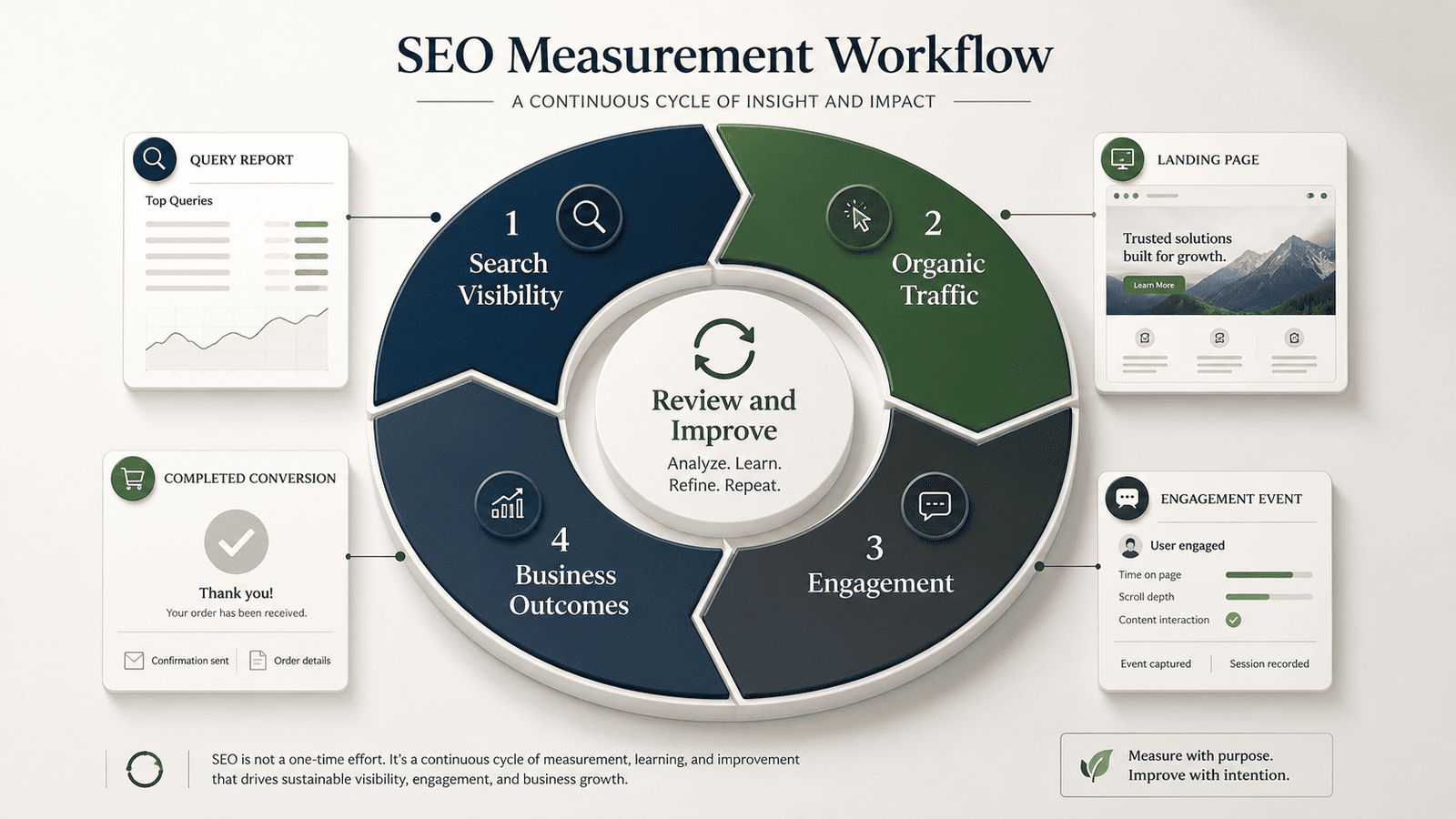
SEO tracking in Google Analytics should cover acquisition, landing-page quality, engagement and outcomes. Keyword data is one layer, not the complete measurement plan.
Measure organic search traffic
Open the Traffic acquisition report and use Session default channel group as the primary dimension. Review the Organic Search row.
GA4 defines Organic Search as traffic arriving through non-ad links in organic search results. Google's current channel description includes traffic from Google AI Overviews and AI Mode within Organic Search.
Visits from assistants such as ChatGPT, Gemini, Claude, Copilot and similar services can appear under the separate AI Assistants channel.
The Traffic acquisition report focuses on the sources of sessions, including sessions from new and returning users. This differs from the User acquisition report, which focuses on how users first arrived.
For recurring SEO reporting, the session-based view is often more practical because it reflects the traffic generated during the selected period.
Track:
- Organic Search users
- Sessions
- Engaged sessions
- Engagement rate
- Average engagement time
- Key events
- Session key-event rate
- Revenue, where ecommerce tracking is correctly implemented
Use trends and segmented comparisons. A traffic increase can be positive, but its value depends on relevance and outcomes.
Measure organic landing pages
A landing page is the first page viewed during a session. Review landing pages for organic sessions to see which content acts as an entry point from search.
Prioritize pages that:
- Generate a substantial share of organic entry traffic
- Are gaining or losing traffic quickly
- Attract valuable queries
- Rank close to stronger visibility
- Receive traffic but few key events
- Have high business importance despite modest volume
A landing-page report is often more actionable than a long keyword list. You control and improve pages, not abstract query rows. A single page may serve dozens or hundreds of related searches.
Measure engagement by page purpose
Different pages require different success signals.
For an informational article, useful indicators may include:
- Meaningful engagement time
- Scroll depth
- Visits to related pages
- Newsletter subscriptions
- Downloads
- Use of an embedded tool
For a service page, more direct indicators may matter:
- Form starts and submissions
- Calls or contact clicks
- Pricing-page visits
- Booking actions
- Qualified lead events
For ecommerce content, examine:
- Product views
- Add-to-cart events
- Checkout starts
- Purchases
- Revenue
Do not use one engagement benchmark for every page. A glossary answer, long tutorial, calculator and product page have different visitor goals.
Measure key events from organic traffic
Identify the actions that represent real progress for the business and mark the appropriate events as key events.
Google's recommended approach is to use an event that measures the important action, then mark that event as a key event so it appears in reporting. The official GA4 key-event documentation explains how these actions are defined and reported.
Then compare:
- Which organic landing pages generate key events
- Which pages attract traffic but fail to move visitors forward
- Whether key-event rate improves after content or UX changes
- Whether brand and non-brand organic journeys behave differently
- Whether mobile organic traffic converts differently from desktop
Be careful with attribution language. You may be able to evaluate organic sessions, landing pages and key events, but the Search Console Queries report does not allow every query to be combined with every Analytics conversion dimension.
Do not claim that GA4 provides perfect organic keyword-to-sale attribution.
Measure trends, not isolated snapshots
SEO changes can take time to influence crawling, indexing, ranking, CTR, traffic and user behavior. Compare consistent date ranges and annotate major changes.
Useful comparisons include:
- Last 28 days versus previous 28 days
- Last three months versus previous three months
- Current quarter versus the same quarter last year
- Before and after a major content update
- Before and after a site migration
- Mobile versus desktop
- Priority country versus all traffic
A weekly pulse can identify unusual movement. A monthly review is usually better for deciding content work. Quarterly analysis is useful for broader strategy.
Turn Query Data into SEO Decisions
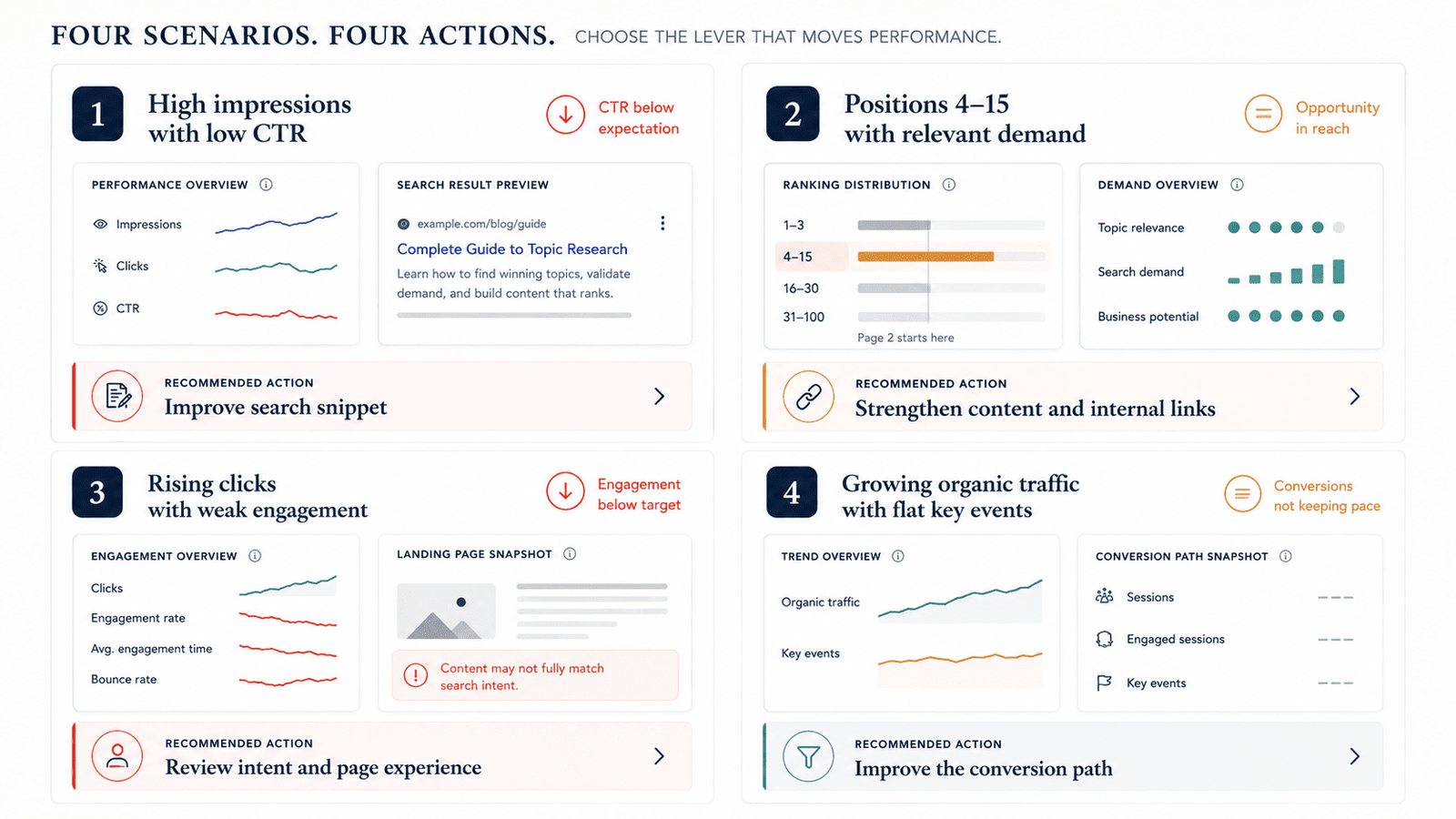
A report should tell you what to do next. The following framework connects common patterns with practical actions.
| Pattern | What it may indicate | Recommended action |
|---|---|---|
| High impressions, low CTR | The result is visible but not earning enough clicks | Review intent, title, description, position and search-result competition |
| Positions roughly 4-15 with relevant impressions | The page may be close to stronger visibility | Improve completeness, internal links, clarity and topical support |
| Clicks rising, engagement weakening | New traffic may be less relevant or the page experience may be weak | Compare queries, devices and landing-page behavior |
| Organic traffic growing, key events flat | Traffic growth is not reaching the intended business action | Improve CTA placement, offer relevance and conversion path |
| Strong CTR, low impressions | The result appeals to searchers but demand or visibility is limited | Expand related coverage without diluting the page |
| Unexpected queries | Google may understand the page differently from your target | Refine headings, examples, internal anchors and topical focus |
| Several pages appearing for the same intent | Possible overlap or cannibalization | Compare page purpose and consolidate, redirect or differentiate |
| Mobile visibility strong, mobile engagement weak | Page experience or intent may differ by device | Review speed, readability, layout and mobile CTA design |
Find high-impression, low-CTR opportunities
Google specifically notes that query data can be used to find expected and unexpected searches and identify high-impression, low-CTR opportunities for improving page titles and descriptions.
Before changing the title, inspect:
- The average position
- The queries contributing impressions
- Whether the page meets those queries
- The title's clarity and uniqueness
- Competing result formats
- Search features around the result
- Differences between mobile and desktop
The goal is not to insert more keywords into the title. The goal is to communicate a more accurate and compelling reason to visit.
Identify content expansion opportunities
A page may earn impressions for useful subtopics that it mentions only briefly. If those queries match the main intent, consider adding a concise section, example, table, comparison or FAQ.
Avoid turning every query into a heading. Search Console data should help you understand reader language and missing information, not force awkward repetition.
Find internal-link opportunities
When a page is close to stronger visibility, relevant internal links can reinforce its relationship to the wider site.
Use descriptive anchors from pages that already discuss the subject. Link where the destination genuinely helps the reader. Do not create dozens of repetitive exact-match anchors.
Review pages with traffic but weak outcomes
A page can rank well and still underperform commercially. Check whether the page:
- Attracts an audience that matches the offer
- Makes the next action clear
- Includes a relevant CTA at the right moment
- Loads and works well on mobile
- Builds sufficient trust
- Links to the right product, service or tool
- Tracks the intended action correctly
Sometimes the issue is not SEO. It may be the offer, UX, tracking or mismatch between informational intent and a highly commercial CTA.
WordPress SEO and Google Analytics
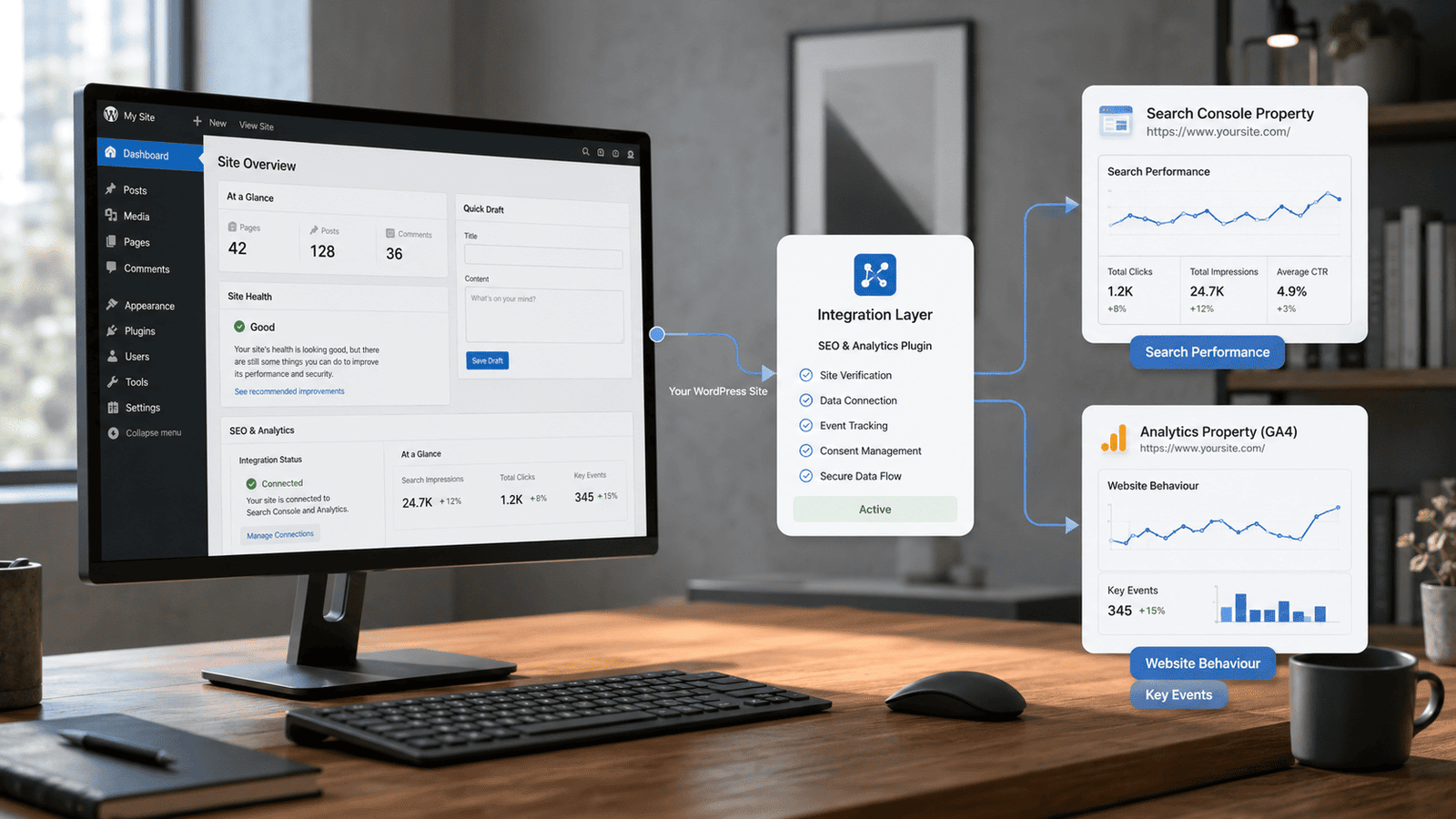
For WordPress SEO, Google Analytics and Search Console can be connected through several methods. For many beginners, the official Site Kit by Google plugin provides the most direct setup.
WordPress.org describes Site Kit as Google's official WordPress plugin for understanding how people find and use a site. It can connect Search Console and Analytics, display information in the WordPress dashboard and set up supported Google services without editing theme source code.
A basic setup is:
- In WordPress, open Plugins -> Add New.
- Search for Site Kit by Google.
- Install and activate the plugin.
- Connect the appropriate Google account.
- Complete the Search Console setup.
- Connect the existing GA4 property or create the required Analytics connection.
- Confirm that the live site is using the intended property and stream.
Site Kit can simplify deployment and surface selected metrics, but you should still use the full Search Console and GA4 interfaces for deeper analysis.
Avoid installing multiple plugins that each insert the GA4 tag. Duplicate tagging can produce unreliable pageviews or events. After setup, test the implementation with GA4 Realtime and your preferred tag-diagnostics method.
Also confirm that caching, consent-management, security and optimization plugins do not block the tag unintentionally.
Privacy and consent requirements depend on where your users are located and how your site collects data, so configure consent with appropriate legal and technical guidance.
Why You Cannot See Keywords in Google Analytics
If you cannot view keywords in Google Analytics after following the setup, work through the following checks.
The Search Console link is missing or incorrect
Open Admin -> Product links -> Search Console Links and verify that the correct Search Console property and web data stream are connected.
Check protocols, subdomains and migrated versions carefully. A correct-looking domain name can still represent a different property scope.
The Search Console collection has not been published
The reports are unpublished by default. Open the GA4 Reports Library and publish the Search Console collection.
This is one of the first settings to check when the integration appears active but the navigation has no Queries report.
The connection is too new
Google states that Search Console data becomes available in Search Console and Analytics about 48 hours after Search Console collects it.
Search Console reports in GA4 do not provide instant keyword reporting.
The website has limited organic visibility
A new, small or rarely searched site may not have enough impressions to populate a meaningful list. Confirm that the Search Console Performance report contains activity.
Some queries are omitted
Search Console omits anonymized queries to protect privacy. It can also truncate data rows, which means visible query rows may not add up to the chart total.
Google advises that not all queries are shown in the table and that more complete query data may require bulk export.
Therefore, a difference between total clicks and the sum of visible query rows does not automatically indicate broken tracking.
The report has a limited history
Search Console keeps 16 months of performance data for these reports. Linked GA4 Search Console reports therefore also contain a maximum of 16 months.
They are not a permanent warehouse for unlimited keyword history.
Export important historical data on a schedule if long-term analysis matters to your business.
You are looking for internal search terms
If you want to see what visitors type into your own website's search box, use site-search tracking rather than the Search Console Queries report.
Enhanced Measurement can collect site-search activity when GA4 recognizes the relevant URL query parameter. For advanced analysis, the search term may need to be available as a custom dimension in Explorations, depending on your setup.
You expect a traditional rank tracker
GA4 and Search Console are not full replacements for a dedicated rank-tracking platform.
They show queries associated with your own search visibility and traffic. A rank tracker may instead monitor a fixed keyword set across selected locations, devices, competitors and dates.
Use each tool for its actual purpose.
Monthly SEO Tracking Checklist
Use this checklist once a month:
- Confirm the GA4 and Search Console connection is active.
- Compare Google organic clicks and impressions with the previous period.
- Review queries gaining or losing meaningful visibility.
- Find high-impression queries with weak CTR.
- Check pages ranking near stronger visibility.
- Compare mobile and desktop performance.
- Review priority countries separately.
- Identify landing pages gaining or losing organic traffic.
- Compare engagement and key events by organic landing page.
- Investigate irrelevant or unexpected queries.
- Look for multiple pages competing for the same intent.
- Record title, content, link, technical and UX changes.
- Assign an owner and review date to every action.
- Export important data needed beyond the 16-month window.
Do not measure success through one number. A strong SEO review connects search visibility, qualified traffic, useful engagement and business outcomes.
Free SEO Tools for Your Keyword Workflow
Pair your keyword tracking with our free SEO tools. Optimize your page titles with the SEO Title Analyzer to improve click-through rates on keywords you are already ranking for. Generate clean URLs with the SEO Slug Generator. Verify that your target pages are indexable using the Page Indexability Checker, and ensure canonical tags are correct with the Canonical Tag Checker.
Conclusion
To track keywords in Google Analytics effectively, treat GA4 and Search Console as connected but distinct measurement systems. Search Console explains how your website appears in Google Search and which visible queries generate impressions and clicks. GA4 shows how organic visitors engage with landing pages and whether they complete important actions.
The strongest SEO measurement process combines query trends, landing-page performance, engagement and key events instead of treating rankings as the final result.
Start by linking the correct properties, publishing the Search Console reports and reviewing a focused set of commercially or strategically important queries. Then turn each finding into a documented action.
Over time, that process will produce a more useful SEO program than collecting large keyword lists without understanding what the traffic does.
Frequently Asked Questions
Can you track keywords in Google Analytics 4?
Yes. You can track keywords in Google Analytics 4 by connecting a verified Google Search Console property to the matching GA4 web data stream.
The Queries report then displays organic Google search queries with clicks, impressions, CTR and average position. The query data originates from Search Console.
How do I view keywords in Google Analytics?
After linking Search Console and publishing its report collection, open Reports -> Search Console -> Queries.
If the Search Console section is missing, open the Reports Library and publish the collection. You also need the required property permissions.
How do I set up keywords in Google Analytics?
You do not manually add organic keywords to GA4. Instead, verify the site in Search Console, link the Search Console property to the matching GA4 web stream and publish the Search Console reports.
For a fixed list of keywords tracked across locations or competitors, use a dedicated rank-tracking tool.
What are Google Analytics organic keywords?
In practical GA4 reporting, "organic keywords" usually refers to the organic Google search queries imported through the Search Console integration.
They are phrases associated with unpaid Google Search visibility and clicks. They are different from paid advertising keywords and internal site-search terms.
Why does Google Analytics show not provided?
Organic search referrer data does not provide GA4 with a complete readable keyword list. Search Console is the appropriate source for Google query performance. For a detailed explanation of why this happens and how to work around it, see How to Find Not Provided Keywords in Google Analytics.
Even Search Console omits some low-volume queries for privacy and applies data limits, so it does not expose every search.
Can GA4 show which organic keyword generated a sale?
Not with complete, direct keyword-level certainty. The Queries report uses Search Console dimensions and metrics and cannot be freely combined with every Analytics dimension.
Use queries to understand discovery, landing pages to connect search with site entry and GA4 events or key events to evaluate outcomes.
How do I measure SEO in Google Analytics?
Use the Traffic acquisition report to measure Organic Search sessions and users. Review organic landing pages, engagement, key events and revenue where applicable.
Link Search Console to add impressions, clicks, CTR, average position and query context.
What is the difference between a keyword and a query?
A keyword often describes the term a marketer targets or bids on. A query is the actual search phrase associated with a user's search.
In Search Console and linked GA4 reports, the Organic Google search query dimension reflects the query that triggered an impression.
Why do Search Console clicks and GA4 sessions differ?
The tools measure different stages and use different methods. Search Console records clicks in Google Search, while GA4 records site activity when the Analytics implementation loads and sends data.
Consent, tagging, redirects, time zones, browser behavior and processing can contribute to differences.
How long does Search Console data take to appear in GA4?
Google says the Search Console data is available in Search Console and Analytics 48 hours after it is collected by Search Console.
Newly linked properties should not be expected to show immediate query data.
How much keyword history can I see in GA4?
The linked Search Console reports include a maximum of 16 months because that is the retention period Google states for this Search Console reporting data.
Export or warehouse data regularly when you need longer historical comparisons.
What is the easiest way to connect WordPress SEO and Google Analytics?
Site Kit by Google is the official WordPress plugin for connecting supported Google services, including Search Console and Analytics.
It can simplify setup and show selected insights in WordPress, although the full GA4 and Search Console interfaces remain better for detailed analysis.